Better Ramp Manual
2.5
Better Ramp is a drop-in replacement for After Effects' built-in Ramp effect — the same Linear and Radial gradients you already know, but with proper alpha handling, perceptual color blending, a shaping curve, scatter dithering, and a built-in blend mode. Use it anywhere you'd reach for the stock Ramp and you'll get vibrant transitions, especially across saturated or complementary colors.
Installing Better Ramp
Better Ramp must be placed in the Plug-ins directory in the After Effects folder. That folder will be named "Adobe After Effects Effects [version]" which has been replaced with "AE" below.
macOS
For macOS, you'll use the .plugin file.
/Applications/AE/Plug-ins
Windows
For Windows, you'll use the .aex file.
\Program Files\AE\Support Files\Plug-ins
If After Effects was running when you installed the plugin, you’ll need to restart it.
Launching Better Ramp
When properly installed, you will find Better Ramp under the Effects > Element Supply Co. menu in After Effects.
Interface
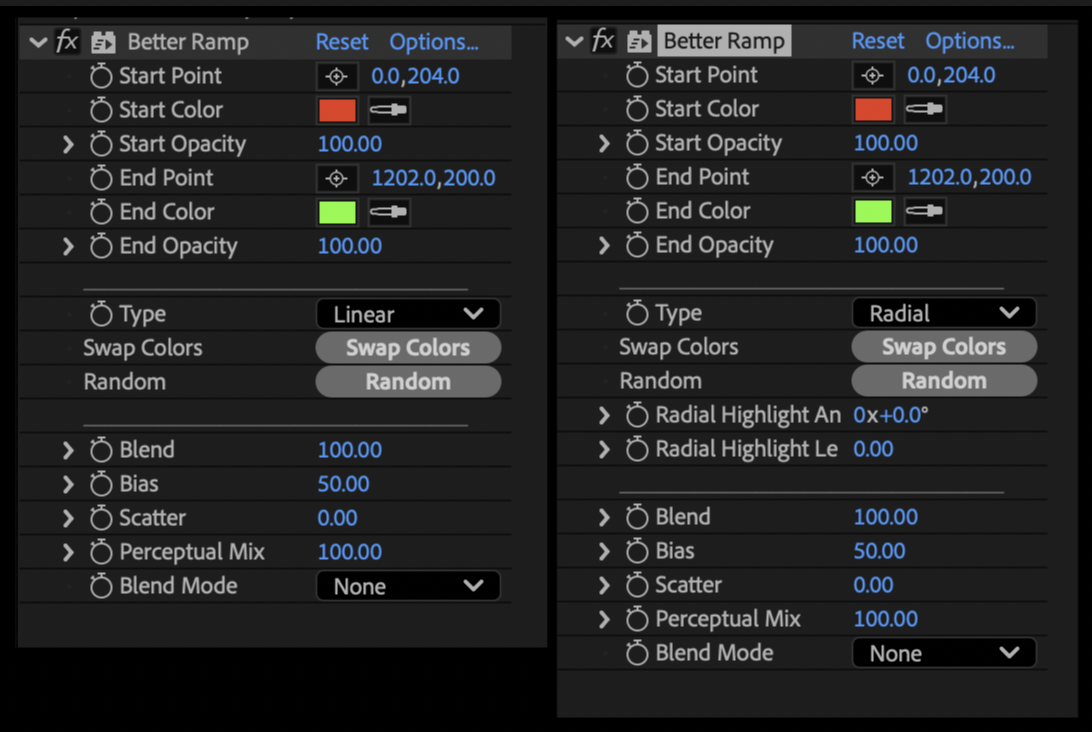
Type
Switches between Linear (start point to end point) and Radial (center expanding outward to a radius). The relevant controls reveal themselves based on which mode you're in.
Start Point / End Point
Define the gradient. In Linear mode these are the two endpoints. In Radial mode, Start Point is the center and End Point sets the radius.
Start Color / End Color (with Opacity)
The two colors of the ramp, each with its own opacity. Alpha is treated correctly — transparent ends fade into nothing instead of producing a hard color edge.
Swap Colors / Random
Quick action buttons. Swap Colors flips Start and End. Random rolls fresh hues for both.
Radial Highlight Angle / Radial Highlight Length (Radial only)
Offsets the focal point of a radial gradient — angle picks the direction, length pushes the highlight away from center toward the rim. Length at 0 gives you a clean centered radial.
Blend
Reshapes the falloff curve. 50 is perfectly linear; lower values narrow the transition into a tighter band, higher values spread it out across the full range.
Bias
Shifts the midpoint of the gradient toward Start (low) or End (high). Useful for pushing the visual weight without moving the points.
Scatter
Adds organic value-noise dithering to the transition. A little goes a long way — great for breaking up banding on subtle gradients.
Perceptual Mix
Blends between standard sRGB color interpolation (0) and OKLab perceptual interpolation (100). Crank it up when you're ramping between saturated complementary colors and you'll skip the muddy gray midpoint that sRGB produces.
Blend Mode
Built-in compositing on top of the source image. Skip the extra effect in your stack.
Thank You!
Thank you so much for purchasing Better Ramp! We appreciate you supporting us and we sincerely hope that it will help save you time in your work! Feel free to contact us to tell us about the awesome stuff you’ve used Better Ramp on. Or contact us if you need help so we can do our best to help you!
Thanks again!