Smooth Threshold Manual
1.0
Smooth Threshold is a replacement for the default Threshold effect in After Effects that adds a control for Smoothness, so that there can be some intermediate greyscale tones between white and black.
Installing Smooth Threshold
Smooth Threshold must be placed in the Plug-ins directory in the After Effects folder. That folder will be named "Adobe After Effects Effects [version]" which has been replaced with "AE" below.
macOS
For macOS, you'll use the .plugin file.
/Applications/AE/Plug-ins
Windows
For Windows, you'll use the .aex file.
\Program Files\AE\Support Files\Plug-ins
If After Effects was running when you installed the plugin, you’ll need to restart it.
Launching Smooth Threshold
When properly installed, you will find Smooth Threshold under the Effects > Element Supply Co. menu in After Effects.
Interface
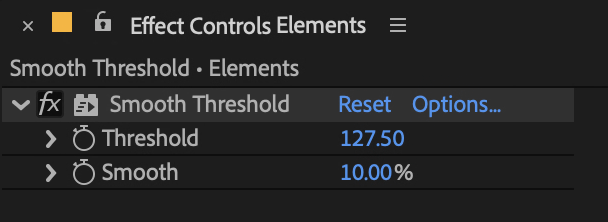
Using Smooth Threshold is simple. There are two settings.
Threshold
This setting functions like the Level setting on the default After Effects Threshold effect—every luminance value in the image above the setting will be rendered white and everything else will be black.
The setting changes to match the bit depth of your project.
Smooth
This setting goes from 0-100%. At 0% this functions exactly like the default Threshold effect. At 100% you'll just have a fully greyscale image. By default, this setting is 10% which is a nice amount to just smooth out the threshold effect subtly.
Thank You!
Thank you so much for purchasing Smooth Threshold! We appreciate you supporting us and we sincerely hope that it will help save you time in your work! Feel free to contact us to tell us about the awesome stuff you’ve used Smooth Threshold on. Or contact us if you need help so we can do our best to help you!
Thanks again!